A clinical study report is a long document with numbered tables, a signed approval page, and firm rules about what goes where. I wanted to show how much of one Quarto can carry on its own. So I built one from public data, and put the whole project on GitHub.
What the Report Is
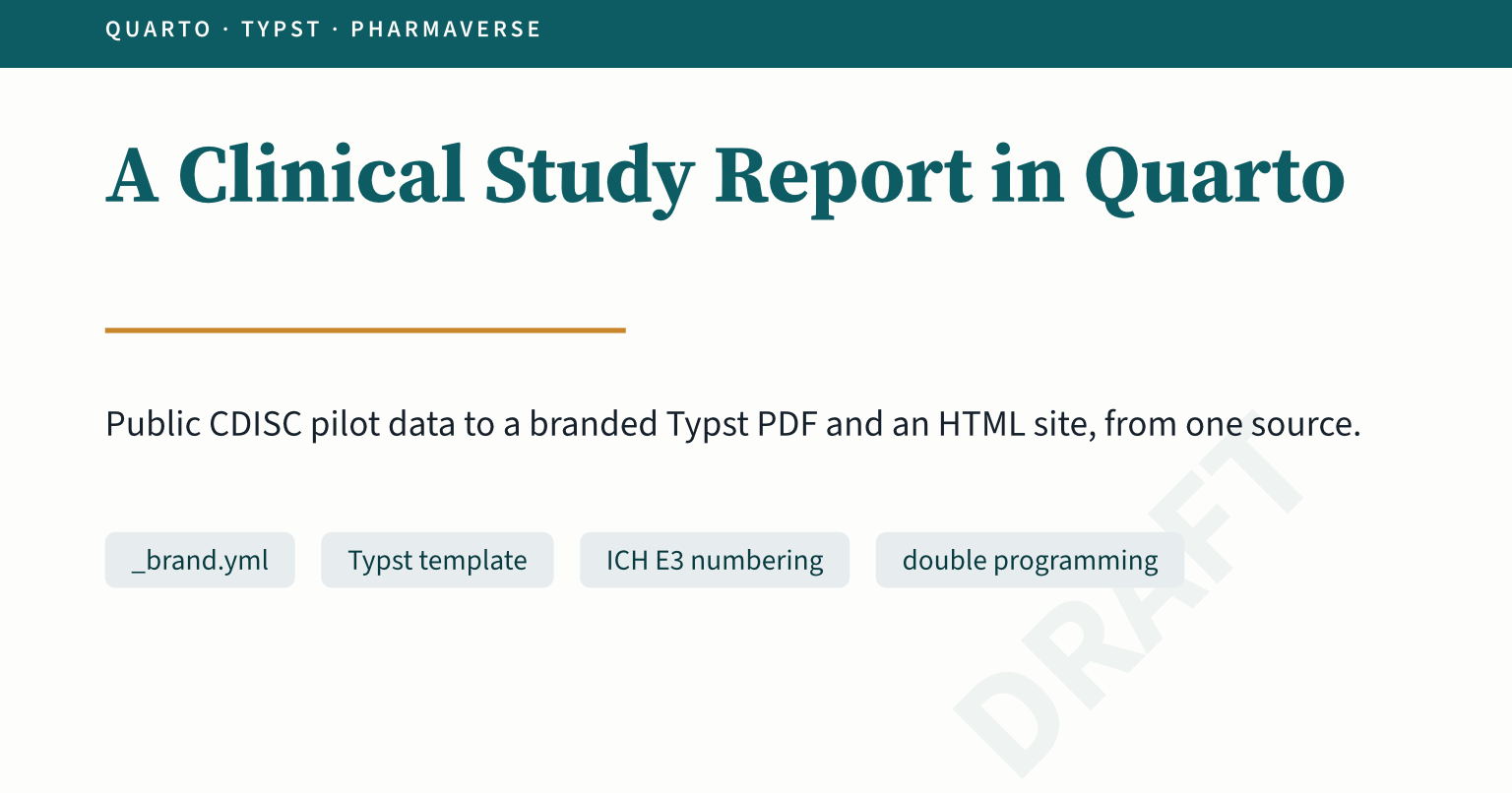
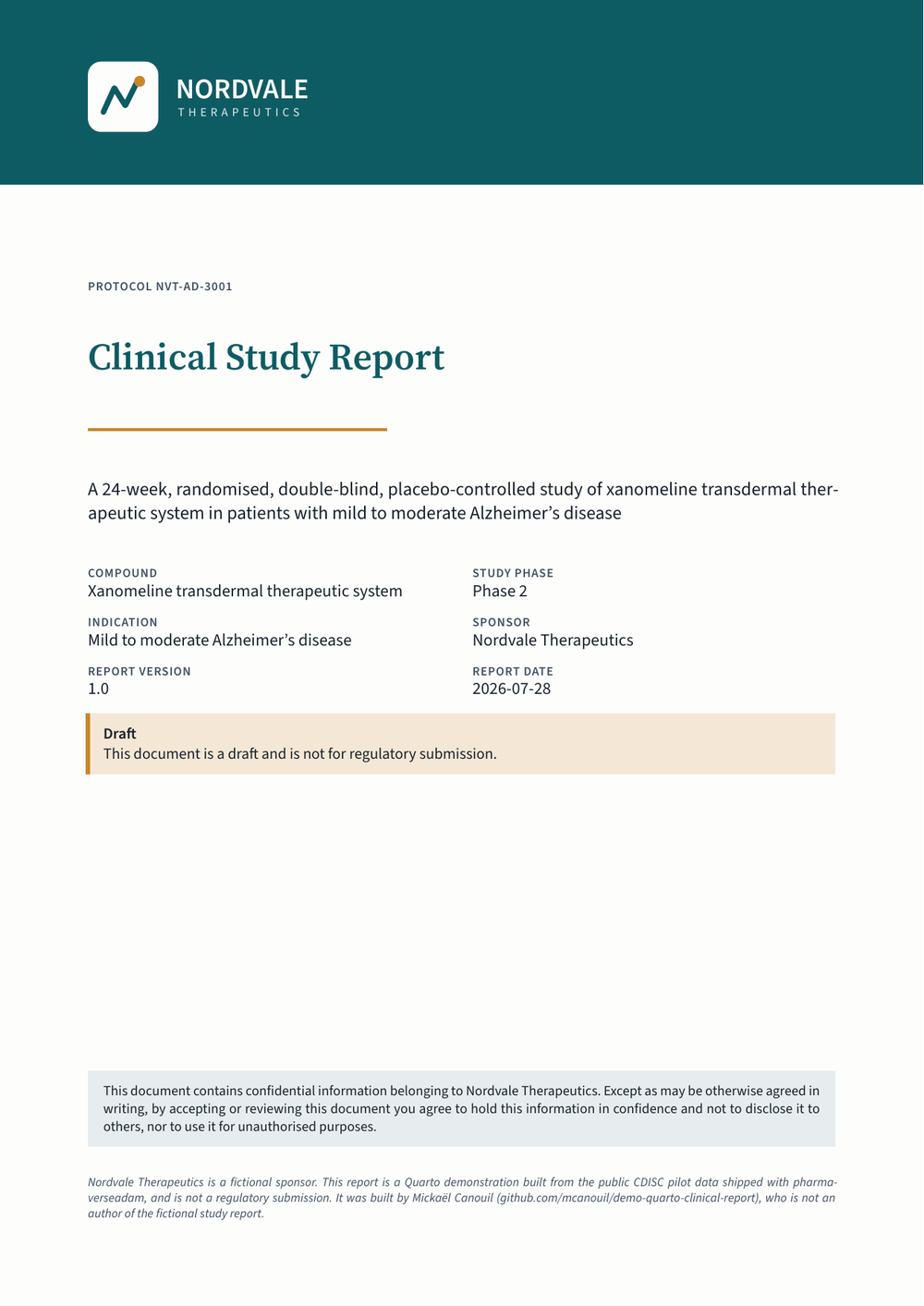
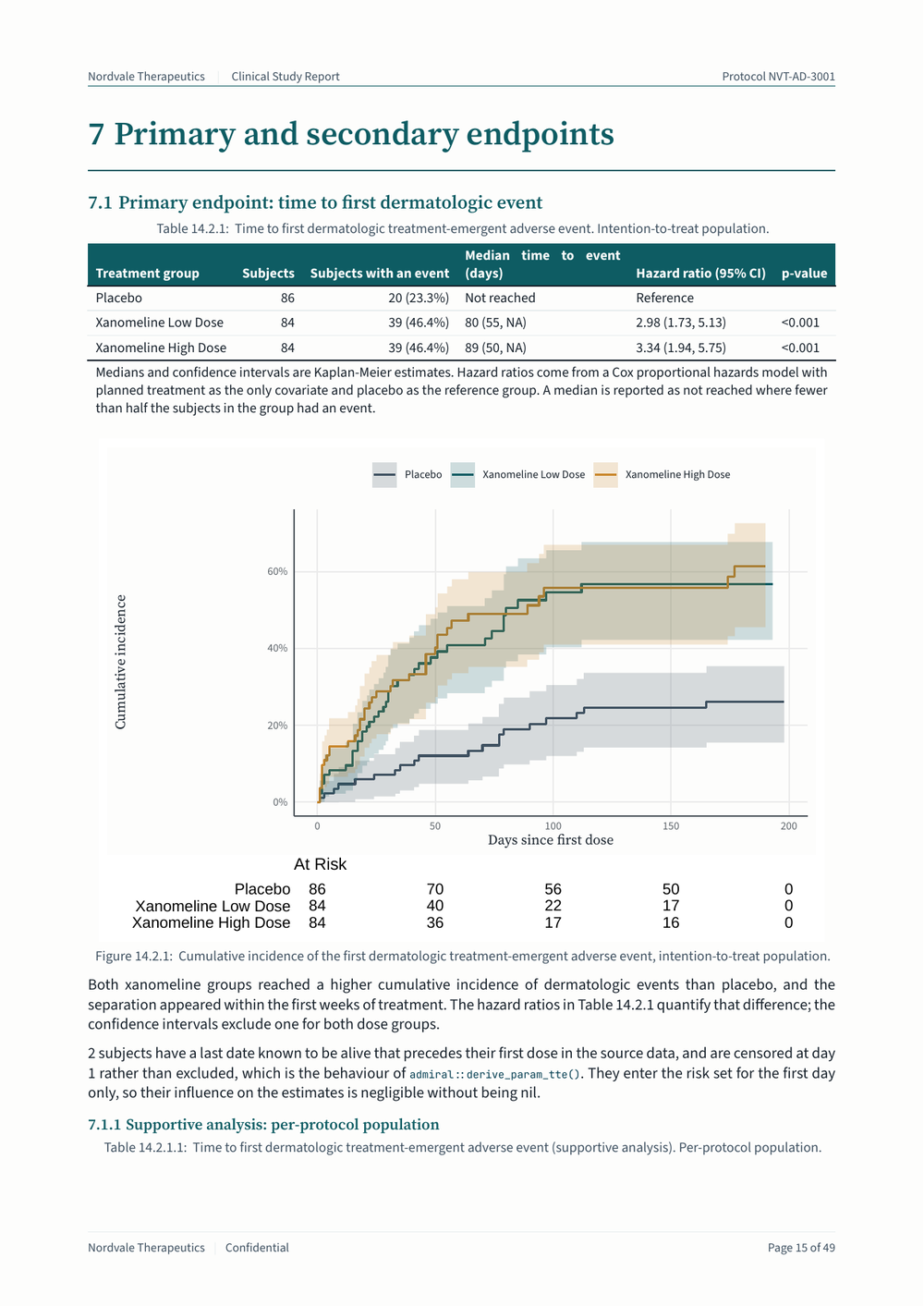
demo-quarto-clinical-report is an abbreviated clinical study report, written in the section order of ICH E31. It has a synopsis, ethics, design, statistical methods, study patients, demographics, endpoints, safety, conclusions, and three appendices. The PDF is 50 pages, cover included, with 30 numbered tables, listings, and figures.
Two things before anything else. Nordvale Therapeutics is a fictional sponsor, invented for the demo. The data are the public CDISC pilot study CDISCPILOT01 shipped with pharmaverseadam, and the report is not a regulatory submission.
One Source, Two Formats
The project carries one extension, _extensions/nordvale/clinical, and that extension contributes two formats.
_extensions/nordvale/clinical/_extension.yml
contributes:
  formats:
1    common:
      toc: true
      toc-depth: 3
      number-sections: true
      lang: en-GB
2      crossref:
        custom:
          - kind: float
            key: listing
            reference-prefix: Listing
            caption-location: top
3    typst:
      template-partials:
        - typst-template.typ
        - typst-show.typ
      filters:
        - path: appendices.lua
          at: post-quarto
4        - path: tlf-numbers.lua
          at: post-quarto
      papersize: a4
      section-numbering: "1.1.1"
5      font-paths:
        - _extensions/nordvale/clinical/fonts
6    html:
      theme:
        - cosmo
        - brand
        - clinical.scss
      filters:
        - inline-svglite.lua
        - path: tlf-numbers.lua
at: post-quarto- 1
- What both formats agree on, merged into each one.
- 2
-
A category of its own for the subject data listings. They are tabular data, and Quarto reserves
lstfor code, which it left-aligns and captions above. - 3
-
The two template partials that build the pages, and
appendices.lua, which letters the appendix chapters and numbers the floats by chapter. - 4
- The filter that gives every output its ICH E3 number, in both formats. See Every Output Has a Number.
- 5
- The fonts travel with the extension, so the PDF does not depend on what is installed.
- 6
-
The theme, and
inline-svglite.lua, which inlines the figures thesvglitedevice draws so the page stylesheet resolves the brand fonts for them, as described in The Brand Reaches the Figures.
A document then asks for clinical-typst or clinical-html, and gets the sponsor identity with it.
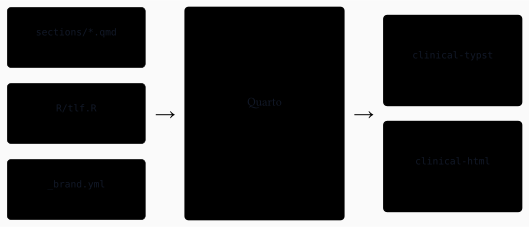
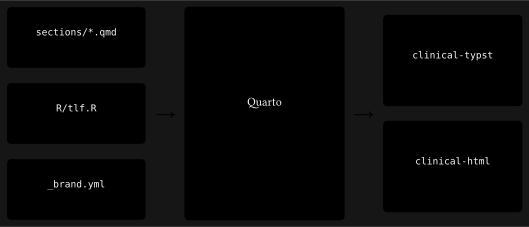
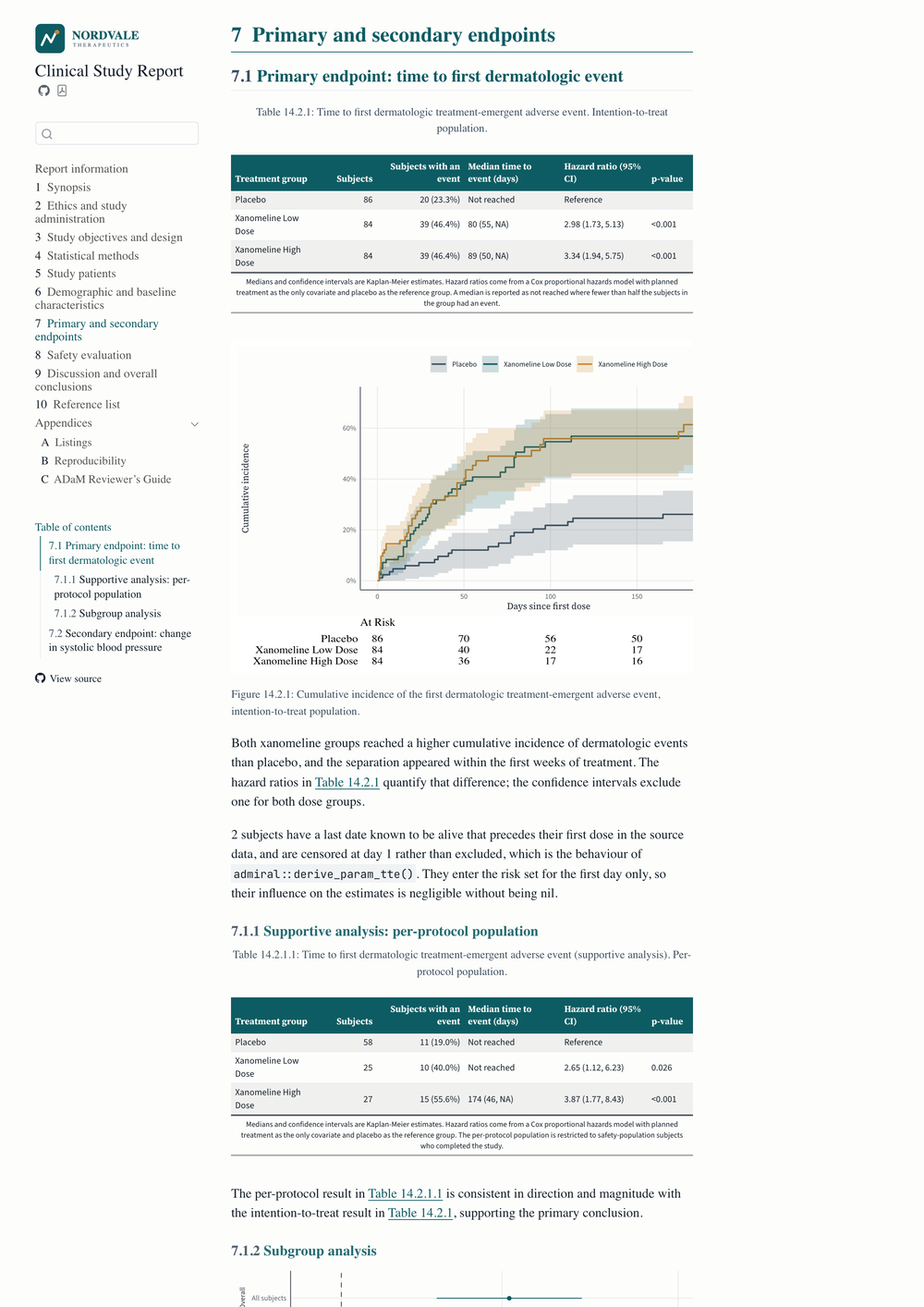
The two renderings are not a screenshot of each other. They are the same chapter, computed once, laid out twice.
The Typst Template
typst-template.typ defines one function, clinical(), with the document metadata as its arguments. typst-show.typ is the piece that maps Quarto metadata onto that function, including the brand colours and the logo Quarto resolves from _brand.yml.
The cover page is a page of its own, with the band reaching the paper edge.
_extensions/nordvale/clinical/typst-template.typ
- 1
- No margin on this page, so a filled block can reach the edge of the paper.
- 2
- The band itself, coloured with the brand primary, with its own inset for the logo.
- 3
- A sponsor with no logo still gets a cover, with the name set in the same place.
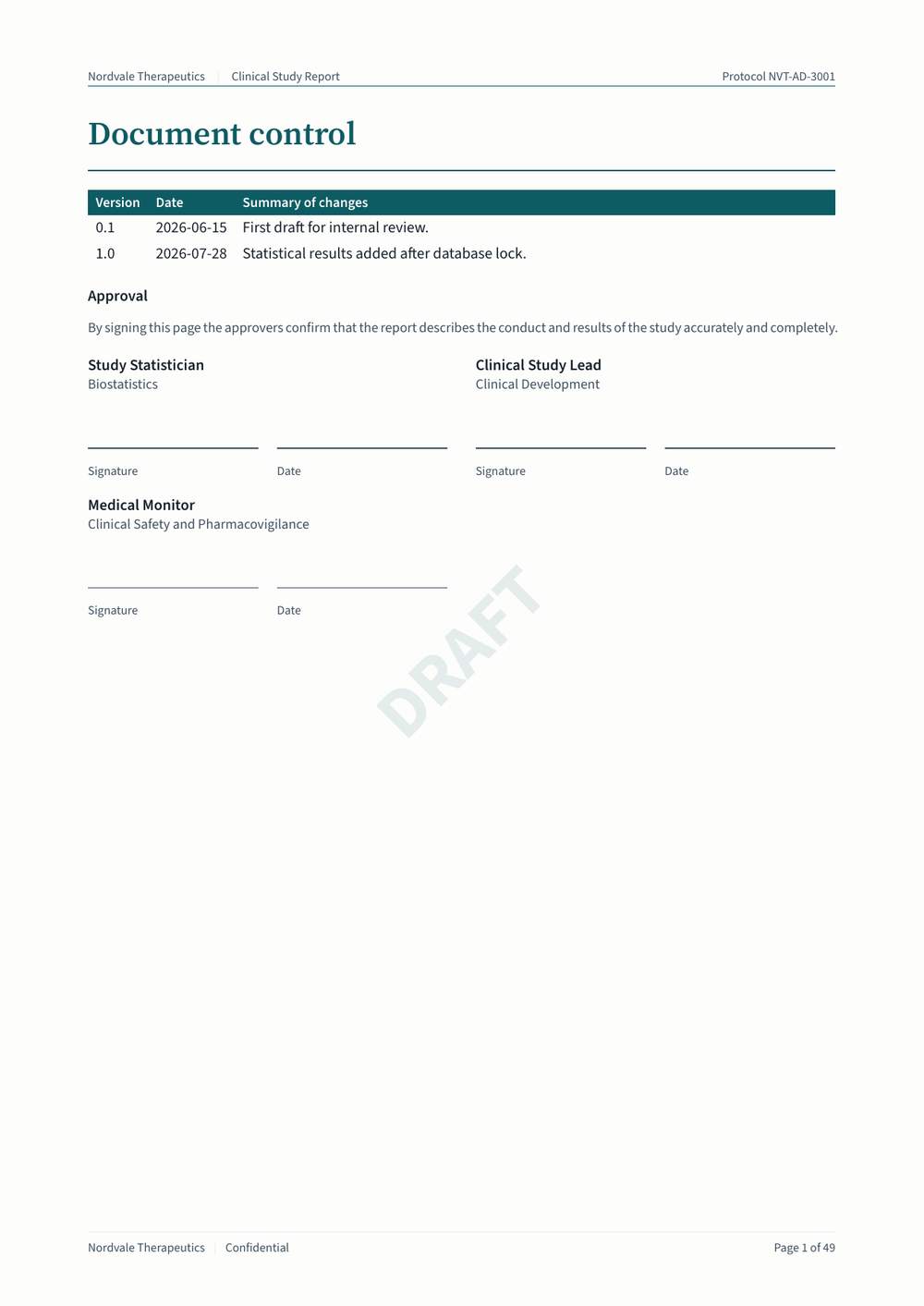
Then comes the document control page, which is the part a regulated document needs and a blog post rarely shows. It carries the revision history and the approval block, and both are written as metadata rather than as prose.
_metadata-csr.yml
1status: draft
2approvals:
  - name: Study Statistician
    role: Biostatistics
  - name: Clinical Study Lead
    role: Clinical Development
  - name: Medical Monitor
    role: Clinical Safety and Pharmacovigilance
3revisions:
  - version: "0.1"
    date: 2026-06-15
    summary: First draft for internal review.
  - version: "1.0"
    date: 2026-07-28
summary: Statistical results added after database lock.- 1
- The one key that decides whether the document is a draft.
- 2
- One entry per approver, in the order they appear on the page.
- 3
- The revision history, printed as a table above the signatures.
The template turns each approval into a signature block.
_extensions/nordvale/clinical/typst-template.typ
#let signature-block(name, role, rule: gray) = block(
  width: 100%,
  inset: (top: 10pt, bottom: 6pt),
)[
1  #text(size: 10pt, weight: "semibold")[#name]
  #linebreak()
  #text(size: 9pt, fill: rule)[#role]
2  #v(26pt)
  #grid(
    columns: (1fr, 1fr),
    column-gutter: 12pt,
3    [#line(length: 100%, stroke: 0.6pt + rule) #text(size: 8pt, fill: rule)[Signature]],
    [#line(length: 100%, stroke: 0.6pt + rule) #text(size: 8pt, fill: rule)[Date]],
  )
]- 1
-
The name and the role, taken from one entry of
approvals. - 2
- The gap a pen needs, which is the only reason this block exists.
- 3
- Two ruled lines, one for the signature and one for the date.
The title of the table of contents comes from quarto.language, which is why the extension asks for Quarto 1.10.18 or later. Everything else the template writes is English in the source: “Signature”, “Date”, “Draft”, “Confidential”, and “Page N of M”. A key under language that Quarto does not ship passes validation and is merged over the defaults. It is then dropped before templates see it, so it reads back as an empty string, with no warning. I reported that as quarto-dev/quarto-cli#14772GitHub, and the fix proposed in quarto-dev/quarto-cli#14773GitHub which might land only in Quarto 1.11.
Two more pieces of furniture come from the same metadata. The running footer numbers the pages as X of Y, which Typst gives you with the final value of the page counter.
[Page #counter(page).display() of #counter(page).final().first()]The watermark is one comparison, read once at the top of the template.
let is-draft = lower(status) == "draft"One key decides the whole document: status: draft puts the watermark on every page and the draft notice on the cover. Setting it to final removes both, and there is nothing else to edit.
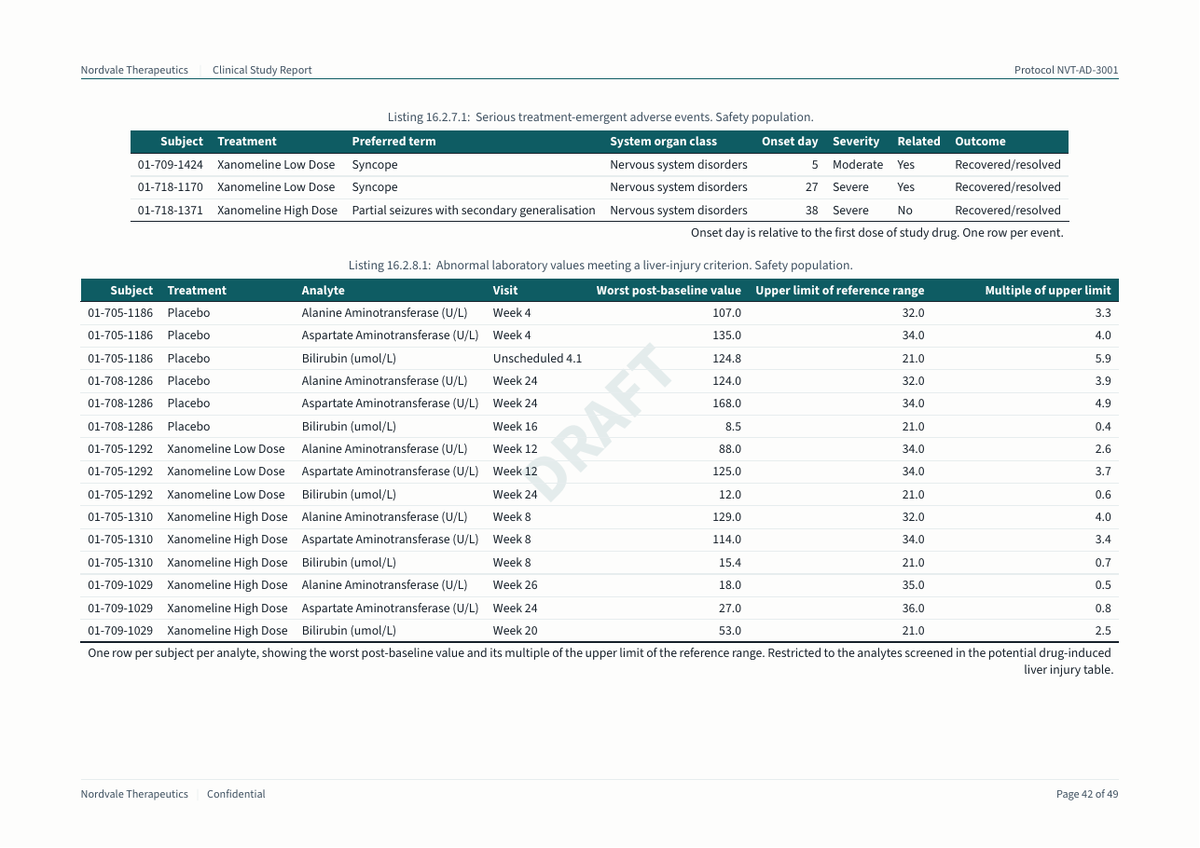
The last piece is orientation. Two listings are wider than a portrait page, so the appendix wraps those two in a ::: {.landscape} div, and only those.
The Brand Reaches the Figures
_brand.yml holds nine named colours and three font families. The fonts are declared with source: file, and point at files bundled in the extension. The PDF then looks the same on my laptop and on a runner. Typst finds them through font-paths, and the HTML theme reads them from the brand.
The page furniture is the easy half. Figures and tables are the other half, because ggplot2 and gt know nothing about a Quarto brand.
This project uses the approach I described in Branded Figures and Tables in R and Python with Quarto, with its companion repository mcanouil/demo-quarto-brand-renderings as the reference implementation. Read that post for the principle, and for the Python side. Only the names change here: get_brand_info() became brand_raw() and brand(), theme_brand() became theme_nordvale(), and gt_brand() became gt_style_nordvale(). configure_brand_fonts() kept its name.
Quarto publishes the resolved brand in an environment variable at render time, so the helpers read it from there.
R/brand.R
brand_raw <- function() {
1  execute_info <- Sys.getenv("QUARTO_EXECUTE_INFO", unset = "")
  if (nzchar(execute_info)) {
    info <- jsonlite::fromJSON(execute_info)
2    brand <- info[["format"]][["render"]][["brand"]]
    if (!is.null(brand) && length(brand) > 0L) {
3      mode <- if ("light" %in% names(brand)) "light" else names(brand)[[1L]]
      return(brand[[mode]][["data"]])
    }
  }
4  yaml::read_yaml(brand_file())
}- 1
- Quarto sets this variable for every chunk it executes, and it holds the render context as JSON.
- 2
-
The brand Quarto resolved, after every
_brand.ymlin the project has been merged. - 3
- The report is printed, so the light mode is the one to take.
- 4
- Outside a render there is no variable, so the helpers read the file and still work in a plain R session and in the tests.
From there, theme_nordvale() styles the plots, treatment_colours() fixes one colour per treatment group, and gt_style_nordvale() styles the tables. That last one stays inside the subset of gt options Quarto can translate to Typst: fonts, colours, borders, and alignment.
One HTML detail is worth the filter it took. The figures are drawn with svglite, and a standalone SVG file has to carry the fonts itself to display them. inline-svglite.lua puts the SVG content into the page instead of a link to the file. The page stylesheet then resolves the brand fonts, and the graphics device does not have to embed them.
Every Output Has a Number
Quarto numbers a table by where it falls in the document, so the first table of chapter 7 would be Table 7.1. A clinical study report is read by the ICH E3 output number instead, so that table is Table 14.2.1 wherever it sits. 14.2.1 reads as section 14, the displays that follow the text, then 2 for efficacy data, then the first table of that group. Demographic displays sit under 14.1 and safety displays under 14.3, while the subject data listings sit under 16.2, where 16.2.7 is the adverse event listing. The guideline stops at the group, and the digits after it are the sponsor’s own sequence. That is why the per-protocol version of 14.2.1 is 14.2.1.1. Tables and figures run as separate series, so a Table 14.2.1 and a Figure 14.2.1 both exist.
The report prints the E3 number, in the caption and in every reference to it. A reviewer asks for 14.3.1.2 and gets the same kind of output in any study from any sponsor.
R/tlf-index.R is where every output number lives, and no other file in the project states one.
R/tlf-index.R
tlf_entry_spec(
1  key = "tte",
2  ref = "tbl-tte",
  kind = "Table",
3  number = "14.2.1",
  section = "14.2",
4  title = "Time to first dermatologic treatment-emergent adverse event",
  subtitle = "Intention-to-treat population",
5  source_note = "Medians and confidence intervals are Kaplan-Meier estimates. ..."
)- 1
-
The name the R code calls the output by.
tlf_entry()stops with an error on a key it does not know, so a typo fails the render instead of printing an empty caption. - 2
- The cross-reference identifier, which every reference in the report points at.
- 3
- The ICH E3 number, which the report prints, and the E3 section it belongs to, which the index of outputs prints.
- 4
-
The title and the population, which
tlf_caption()writes under the output. - 5
-
The source note, which
tlf_output()attaches to the table itself.
A section then wraps the output in a cross-reference div and asks the index for the caption.
sections/07-efficacy.qmd
::: {#tbl-tte}

```{r}
#| label: tte

tlf_output(tlf_tte_summary(adtte), "tte")
```

`{r} tlf_caption("tte")`

:::
Getting that number onto the page took more than metadata. Quarto builds a float number from the chapter and a running count, and nothing in the document can set it. A custom cross-reference type names the prefix, not the number. So the pre-render step writes the numbers to a file, and a filter applies them, differently in each format. In HTML the filter sets the number on the float, which Quarto then stringifies into the caption. In Typst it emits one show rule per label, because Typst numbers its own figures and ignores what the filter did to the float.
An HTML book needs one more step. Quarto writes its cross-reference index before any extension filter runs. A book then fills every reference from that index after Pandoc, so a filter never reaches those numbers. A post-render step renumbers them on the rendered pages instead.
The appendix then lists every output. tlf_catalogue() prints the index as a definition list, where each term is a cross-reference that resolves to the ICH E3 number, and each description carries the E3 section and the population.
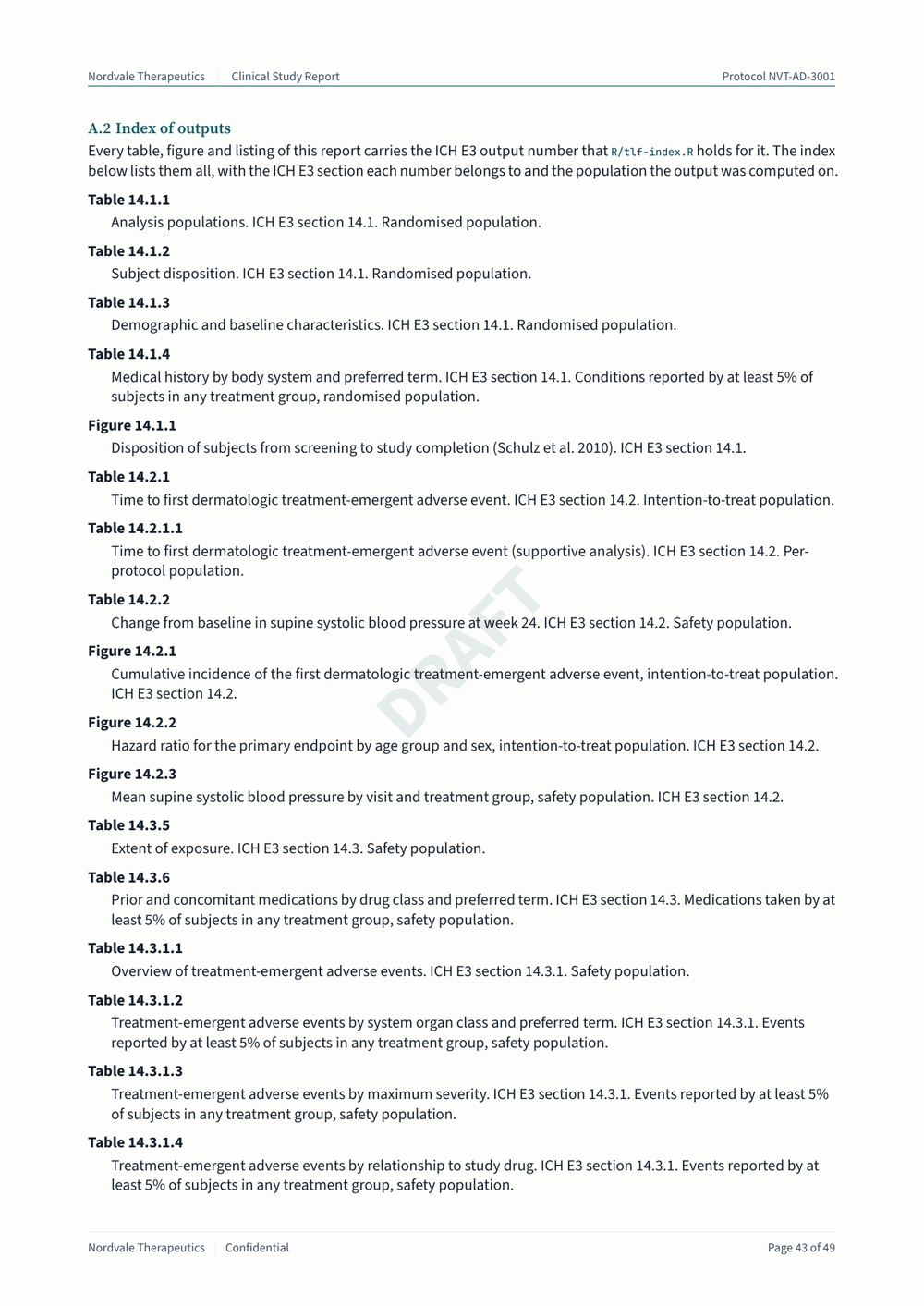
Changing an output number is a one-line edit in one file, and every mention of it follows.
Book or One Long Document
A format is not tied to one kind of project, and this one shows it. The same extension renders the same sections as a Quarto book and as a single long document, and a profile picks between them. _quarto-book.yml builds the book. _quarto-doc.yml renders csr.qmd, which is nothing but includes, alongside the companion statistical analysis plan.
quarto render                 # the book, in _book/
quarto render --profile doc   # the single document, in _doc/
Both project types produce a Typst PDF and an HTML output. The PDF comes out much the same either way, 50 pages in both, so the project type hardly shows there. The HTML is where it shows, and the book is the one I recommend to use. Each chapter becomes a page of its own, with a sidebar and a search box. A reviewer can then send a link straight to the section they ask about.
The study metadata that both share sits in _metadata.yml. The per-document keys do not, and that is deliberate. A shared _metadata.yml is always merged, and merging concatenates list values instead of replacing them. Put those keys in the shared file, and the approvals of the analysis plan join the approvals of the report. They live in _metadata-csr.yml instead, which the report loads, while sap.qmd sets its own.
Checking the Numbers
A report of computed numbers needs something to check those numbers. The project has three test files, and the workflow runs them before it renders anything.
test-invariants.R checks the properties every table quietly relies on. The population flags nest as the methods chapter claims. A reason for discontinuation is present exactly for the subjects who did not complete. No subject is lost between the source data and the analysis datasets.
test-independent-test.R recomputes every headline number the prose states, from the source packages rather than from the derived datasets. If R/00-adam.R gets a filter wrong, the test disagrees instead of restating the mistake.
test-double-programming.R refits the models by a second route and compares the results with the strings the report prints. It catches a wrong estimate, a wrong reference group, or a transposed confidence interval, which no structural test can see.
The reproducibility appendix carries the rest of the traceability. It holds the analysis results datasets gtsummary keeps behind each table, a define.xml-style metadata excerpt, and the empty table shells next to the locked table. It also holds the session information, and an renv lockfile snapshotted in explicit mode from DESCRIPTION.
What I Would Watch Out For
Four things are worth knowing before you start. None of them are hard once you know where to look, and each one can cost an afternoon if you do not.
- Floats numbered by chapter.
-
Typst numbers figures from one counter, and Quarto zeroes that counter at each chapter. Typst is never told which chapter it is in, so every chapter opened with “Table 1”.
appendices.luareads the chapter from the heading counter and prefixes the float number with it. The same filter gives the appendices their letters. - Tables that do not break.
-
Quarto wraps every cross-referenced float in a
figure, and afigureblock is not breakable. A table taller than the space left overflowed the page instead of continuing on the next one. One show rule fixes it, and Typst then repeats the header rows on each page.
show figure.where(kind: "quarto-float-tbl"): set block(breakable: true)Plots stay unbreakable, so an image never parts from its caption.
- Counting before filtering.
- A few subjects in the pilot data have a last date known to be alive that precedes their first dose. The report discloses how many, and that count is taken from the unfiltered derivation on purpose. Taken after the filter, the count can report zero one day, and turn a disclosure into a false statement.
- Defaults that are not neutral.
-
emmeans::contrast(method = "trt.vs.ctrl")applies a Dunnett-style multiplicity adjustment by default. That adjustment widens the intervals beyond what the statistical methods chapter and the analysis plan describe. The secondary endpoint is descriptive here, so the call passesadjust = "none"and says so.
Render It Yourself
You need Quarto 1.10.18 or later, for the quarto.language variables the Typst template reads, and R 4.4 or later.
Rscript -e 'renv::restore()'
quarto render
The repository is at mcanouil/demo-quarto-clinical-report, and the rendered report is published at https://m.canouil.dev/demo-quarto-clinical-report/. Here is the whole PDF, the one the workflow publishes on every push to main.
Open it full size: Typst PDF, HTML book.
Hope this shows that Quarto can be used in such context while providing profesional outputs.
Happy publishing!
Footnotes
ICH E3, Structure and Content of Clinical Study Reports, see https://database.ich.org/sites/default/files/E3_Guideline.pdf.↩︎
Reuse
Citation
@misc{canouil2026,
  author = {CANOUIL, Mickaël},
  title = {A {Clinical} {Study} {Report} in {Quarto,} {End} to {End}},
  date = {2026-08-17},
  url = {https://mickael.canouil.fr/posts/2026-08-17-quarto-clinical-report/},
  langid = {en-GB}
}