Keisen 0.1.0 is out on Typst Universe. It is a Typst package for display tables: the kind of table you put in a report or a paper, with a title, grouped rows, formatted numbers, and footnotes.
I have used gt in R since its early days, and great_tables in Python since it came out. When I write in Typst, I miss them. Typst’s table() is good at layout, but every number is yours to format, cell by cell. Rounding, padding the decimals, adding the currency symbol, numbering the footnotes: you type all of it. I wanted the same feeling as gt in Typst: you say what each column is, and the package writes the cells.
The name comes from Japanese. Keisen (罫線) means the ruled lines of a table.
Keisen brings the gt way of building tables to Typst: you describe the columns, and Keisen formats the cells. Get it with #import "@preview/keisen:0.1.0": *, and read the documentation.
Every table in this post is compiled from its code when the post renders, with Keisen 0.1.0.
1 Plain Typst Against Keisen
Here is a baseline characteristics table, the first table of most clinical trial reports. Continuous variables show the mean and the standard deviation, categorical variables show the count and the percentage.
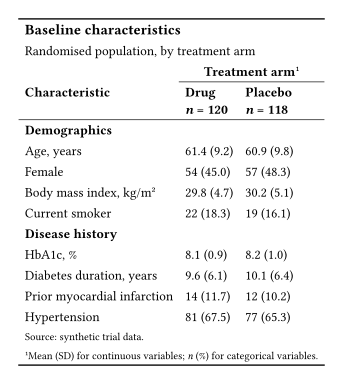
I wrote it twice, from the same data. Both versions draw the table above. The data is the same in both, so it is left out of the two listings below.
Plain Typst
#let fixed(value, digits) = {
  let text = str(calc.round(value, digits: digits))
  let parts = text.split(".")
  let decimals = parts.at(1, default: "")
  parts.at(0) + "." + decimals + "0" * (digits - decimals.len())
}

#let summary(value, spread, kind) = {
  let shown = if kind == "mean" { fixed(value, 1) } else { str(value) }
  [#shown (#fixed(spread, 1))]
}

#let body = ()
#let previous = none
#for row in range(data.characteristic.len()) {
  let section = data.section.at(row)
  if section != previous {
    body.push(table.cell(colspan: 3, strong(section)))
    previous = section
  }
  let kind = data.kind.at(row)
  body.push(data.characteristic.at(row))
  body.push(summary(data.drug.at(row), data.drug-spread.at(row), kind))
  body.push(summary(data.placebo.at(row), data.placebo-spread.at(row), kind))
}

#table(
  columns: 3,
  align: start,
  stroke: none,
  inset: 0.45em,
  table.hline(stroke: 1pt),
  table.cell(colspan: 3, text(
    size: 1.1em,
    weight: "bold",
  )[Baseline characteristics]),
  table.cell(colspan: 3)[Randomised population, by treatment arm],
  table.header(
    [],
    table.cell(colspan: 2, align: center)[*Treatment arm*#super[1]],
    table.hline(start: 1, stroke: 0.5pt),
    [*Characteristic*],
    [*Drug* \ *_n_ = 120*],
    [*Placebo* \ *_n_ = 118*],
    table.hline(stroke: 0.5pt),
  ),
  ..body,
  table.cell(colspan: 3, text(size: 0.8em)[Source: synthetic trial data.]),
  table.cell(colspan: 3, text(size: 0.8em)[
    #super[1]Mean (SD) for continuous variables; _n_ (%) for categorical variables.
  ]),
  table.hline(stroke: 1pt),
)
Keisen
#display-table(
  data,
  table-header(
    title: [Baseline characteristics],
    subtitle: [Randomised population, by treatment arm],
  ),
  table-stub(
    rowname: "characteristic",
    group: "section",
    label: [Characteristic],
  ),
  columns-hide("kind"),
  format-number(
    ("drug", "placebo"),
    rows: row => row.kind == "mean",
    decimals: 1,
  ),
  format-integer(("drug", "placebo"), rows: row => row.kind == "count"),
  format-number(("drug-spread", "placebo-spread"), decimals: 1),
  columns-combine(
    "drug-arm",
    ("drug", "drug-spread"),
    (value, spread) => [#value (#spread)],
    label: [Drug \ _n_ = 120],
  ),
  columns-combine(
    "placebo-arm",
    ("placebo", "placebo-spread"),
    (value, spread) => [#value (#spread)],
    label: [Placebo \ _n_ = 118],
  ),
  table-spanner([Treatment arm], ("drug-arm", "placebo-arm")),
  table-footnote(
    [Mean (SD) for continuous variables; _n_ (%) for categorical variables.],
    locations: cells-column-spanners(),
  ),
  table-source-note([Source: synthetic trial data.]),
  theme: theme-booktabs(),
)
The plain Typst version is long because every decision is written out. A fixed() helper rounds a float and pads the zeros the float dropped. A loop glues the mean and the standard deviation into one cell, and another one adds a full-width row for each group. The footnote mark is a #super[1] typed by hand, in two places that have to agree.
In Keisen, each of those is one call. format-number() picks the rows by what they hold (row.kind == "mean"), columns-combine() merges two columns into “value (spread)”, and table-footnote() places and numbers the mark. None of these calls says where a cell is or how it looks.
Less to type, less to fix: no cell is typed by hand, so when the data changes, the table follows it.
2 A Results Table, the gt Way
The second table of the same report is often a regression table. I will build it one step at a time, the way I would in gt. Each step adds a few calls to the same display-table(), and the gt function that does the same job is named next to it.
The data is one Typst dictionary, one array per column: the estimate, the bounds of the 95% confidence interval, and the p-value, for an unadjusted and an adjusted model.
#let data = (
  term: (
    "Treatment",
    "Age, per 10 years",
    "Female",
    "Body mass index",
    "Current smoker",
  ),
  crude: (-0.42, 0.18, -0.05, 0.09, 0.21),
  crude-lower: (-0.61, 0.07, -0.24, 0.04, -0.02),
  crude-upper: (-0.23, 0.29, 0.14, 0.14, 0.44),
  crude-p: (0.000021, 0.0012, 0.61, 0.00034, 0.074),
  adjusted: (-0.39, 0.15, -0.02, 0.07, 0.12),
  adjusted-lower: (-0.57, 0.04, -0.20, 0.02, -0.10),
  adjusted-upper: (-0.21, 0.26, 0.16, 0.12, 0.34),
  adjusted-p: (0.000038, 0.0081, 0.83, 0.0049, 0.29),
)
2.1 The Default Table
With no other argument, display-table() already draws a table, like gt() on a data frame. Every array becomes a column, and the column names come straight from the dictionary keys.

The numbers come straight from the floats, so −0.2 sits under −0.24, and 0.000021 sits next to 0.61.
2.2 Header and Stub
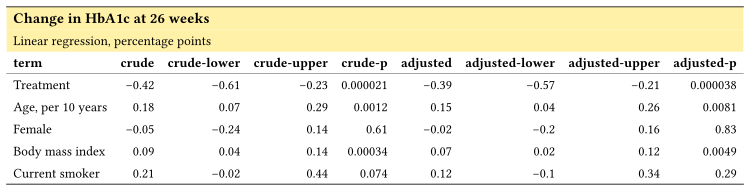
table-header() adds the title and the subtitle, like tab_header(). table-stub() makes the term column the row labels, like rowname_col in gt(). From here on, the cells a step changes are shaded in yellow in the render. The shading only marks the change, and it is not part of the code.
Header
  table-header(
    title: [Change in HbA1c at 26 weeks],
    subtitle: [Linear regression, percentage points],
  ),
Stub
table-stub(rowname: "term", label: [Term]),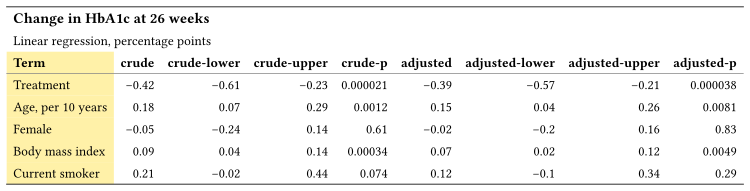
2.3 Numbers
format-number() is fmt_number(). It takes column names, or a function that picks columns by name, so one call covers every estimate and bound, and another covers the p-values. format() with a rows condition writes < 0.001 for the small p-values, the job of sub_small_vals().
  format-number(
    name => name != "term" and not name.ends-with("-p"),
    decimals: 2,
  ),
  format-number(name => name.ends-with("-p"), decimals: 3),
  format("crude-p", value => [< 0.001], rows: row => row.crude-p < 0.001),
  format("adjusted-p", value => [< 0.001], rows: row => row.adjusted-p < 0.001),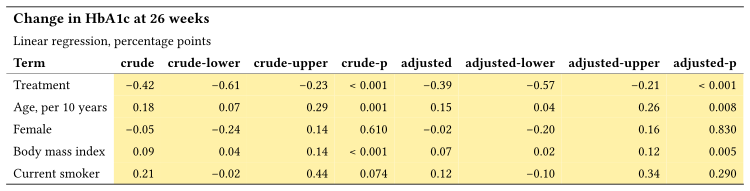
2.4 Columns and Spanners
columns-combine() merges the two bounds into one “95% CI” column, like cols_merge(). columns-label() is cols_label(), and table-spanner() is tab_spanner().
  columns-combine(
    "crude-interval",
    ("crude-lower", "crude-upper"),
    (low, high) => [#low, #high],
    label: [95% CI],
  ),
  columns-combine(
    "adjusted-interval",
    ("adjusted-lower", "adjusted-upper"),
    (low, high) => [#low, #high],
    label: [95% CI],
  ),
  columns-label(
    crude: [Estimate],
    crude-p: [_p_],
    adjusted: [Estimate],
    adjusted-p: [_p_],
  ),
  table-spanner([Unadjusted], ("crude", "crude-interval", "crude-p")),
  table-spanner([Adjusted], ("adjusted", "adjusted-interval", "adjusted-p")),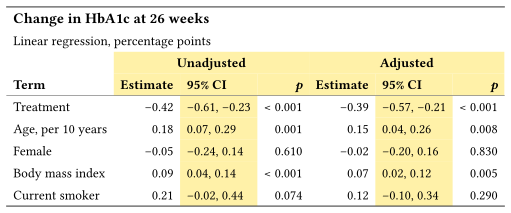
The combined column reads the formatted bounds, so they keep their two decimals.
2.5 Style from the Data
table-style() is tab_style(). The location says which cells: the adjusted columns, in the rows where the adjusted p-value is below 0.05.
  table-style(
    style(text: (weight: "bold")),
    locations: cells-body(
      columns: ("adjusted", "adjusted-interval", "adjusted-p"),
      rows: row => row.adjusted-p < 0.05,
    ),
  ),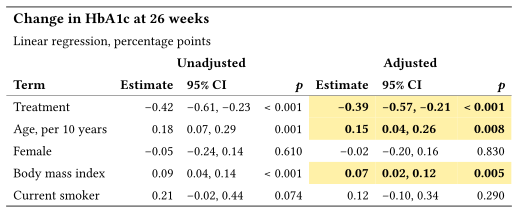
If the data changes, the bold follows it. There is no row number to update.
2.6 Notes and Theme
table-footnote() is tab_footnote(), here attached to the “Adjusted” spanner, and table-source-note() is tab_source_note(). The theme argument plays the part of opt_stylize(): theme-booktabs() draws the three rules of a publication table.
  table-footnote(
    [Adjusted for every other term in the table.],
    locations: cells-column-spanners(spanners: [Adjusted]),
  ),
  table-source-note([Source: synthetic trial data.]),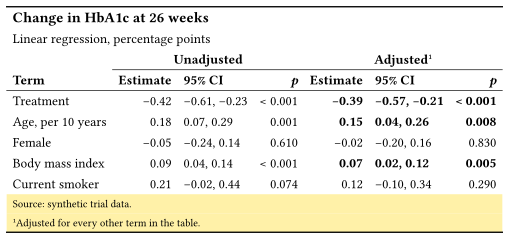
If you know gt or great_tables, most of Keisen will feel familiar, with hyphens in place of underscores.
3 Other Features
The two tables above leave out a good part of the first release. The Keisen website has an example page for each feature, with the code and a few words on when to use it. Each miniature below links to its page.
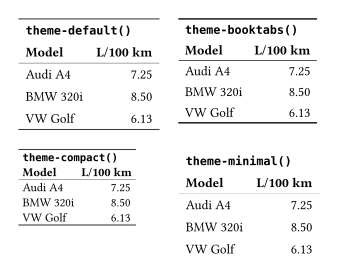
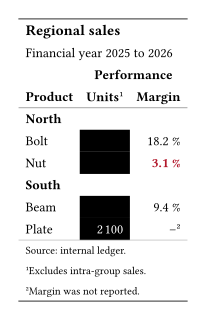
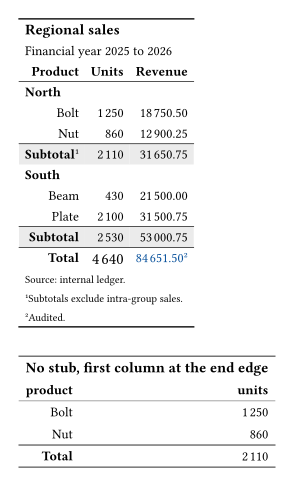
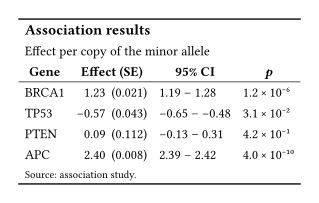
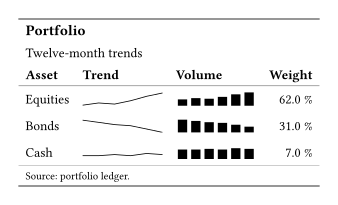

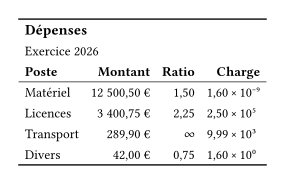
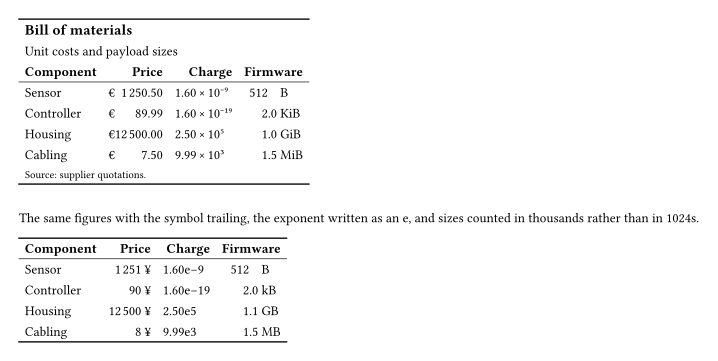
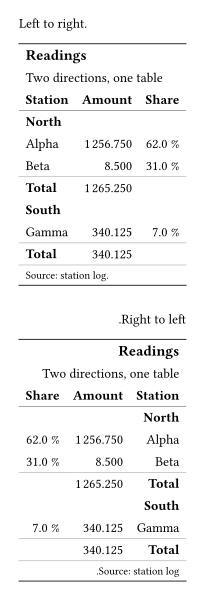
A row group that runs past the end of a page reprints its label on the next page, because Keisen draws groups as native repeating subheaders. A single picture does not show that well, so see Carry a table across pages.
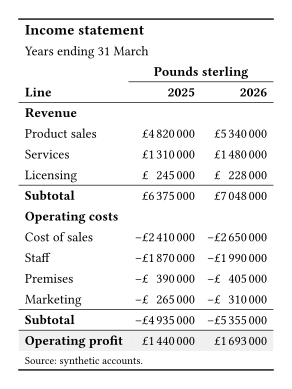
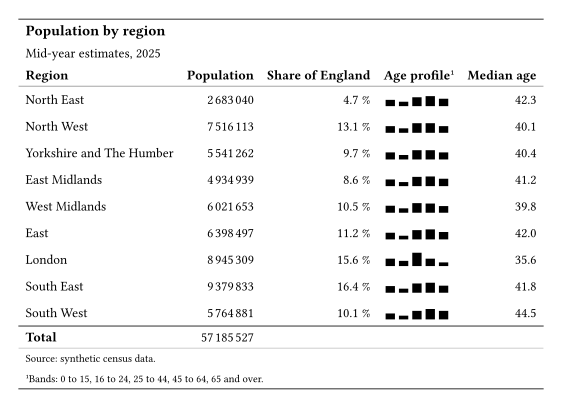
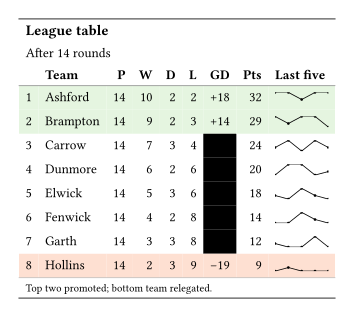
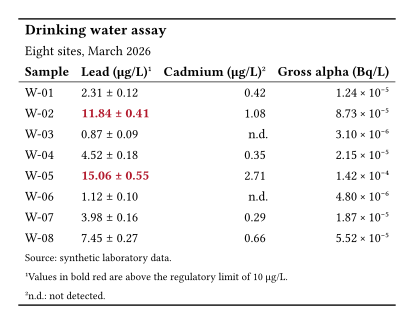
The website also has a gallery of six full tables, each next to its plain Typst version. Here are the four tables I have not shown yet.
4 Installation
Keisen is on Typst Universe, and it imports no other package:
#import "@preview/keisen:0.1.0": *The documentation has a reference page for every function, the examples, and the gallery. It also ships a copy for language models at llms.txt.
- Repository: mcanouil/keisen.
- Documentation: m.canouil.dev/keisen.
- Typst Universe: @preview/keisenGitHub.
Keisen is an unfunded spare-time project, and the API is still settling. Bug reports are welcome on the issue tracker, and ideas and questions in Discussions. I do not accept pull requests for now, and I will say so in the README when that changes.
If you build a table with Keisen, I would like to see it in the Show and tell category of Discussions.
Reuse
Citation
@misc{canouil2026,
  author = {CANOUIL, Mickaël},
  title = {Keisen 0.1.0: {Display} {Tables} for {Typst}},
  date = {2026-10-22},
  url = {https://mickael.canouil.fr/posts/2026-10-22-keisen-0-1/},
  langid = {en-GB}
}